# How To: Start9 server as Tor proxy
**URL:** https://community.start9.com/t/how-to-start9-server-as-tor-proxy/1805
**Category:** Guides
**Tags:** hack, diy
**Created:** [August 26, 2024, 11:37am UTC](https://community.start9.com/t/how-to-start9-server-as-tor-proxy/1805 "2024-08-26T11:37:41Z")
**Posts on this page:** 5
**Page:** 1
### Author:  [@paulscode](https://community.start9.com/u/paulscode)
#### Post date: [August 26, 2024, 11:37am UTC](https://community.start9.com/t/how-to-start9-server-as-tor-proxy/1805/1 "2024-08-26T11:37:41Z")
Is it possible to use a server running StartOS as a Tor proxy for other computers on the same local network? I suppose this would come with a new set of additional security considerations. Just curious if this is an option.
---
### Author:  [@StuPleb](https://community.start9.com/u/StuPleb)
#### Post date: [August 26, 2024, 12:16pm UTC](https://community.start9.com/t/how-to-start9-server-as-tor-proxy/1805/2 "2024-08-26T12:16:12Z")
No, unless you’re up for developing or managing the implementation of something like this.
I’m not sure it would make sense to go through with it though, seeing as this can be done from the router without any additional work.
---
### Author:  [@k0gen](https://community.start9.com/u/k0gen)
#### Post date: [September 2, 2024, 8:16am UTC](https://community.start9.com/t/how-to-start9-server-as-tor-proxy/1805/3 "2024-09-02T08:16:01Z")
Hi there,
Yes, it is indeed possible to use a server running StartOS as a Tor proxy for other computers on the same local network. While Stuart is correct that this isn’t officially supported and might require some manual tweaking, it can be done with a few steps.
You can SSH into your StartOS server and follow these steps:
Run the upgrade script:
```shell
sudo /usr/lib/startos/scripts/chroot-and-upgrade
```
Edit the Tor configuration file:
```shell
nano /etc/tor/torrc
```
Add the following line to allow connections from your local network:
```shell
SocksPolicy accept 192.168.1.0/24
```
Replace `192.168.1.0/24` with your actual local network range.
Exit the chroot environment:
```shell
exit
```
Done! Now you can set up your lan clients to use your server as Tor proxy.
Firefox example:
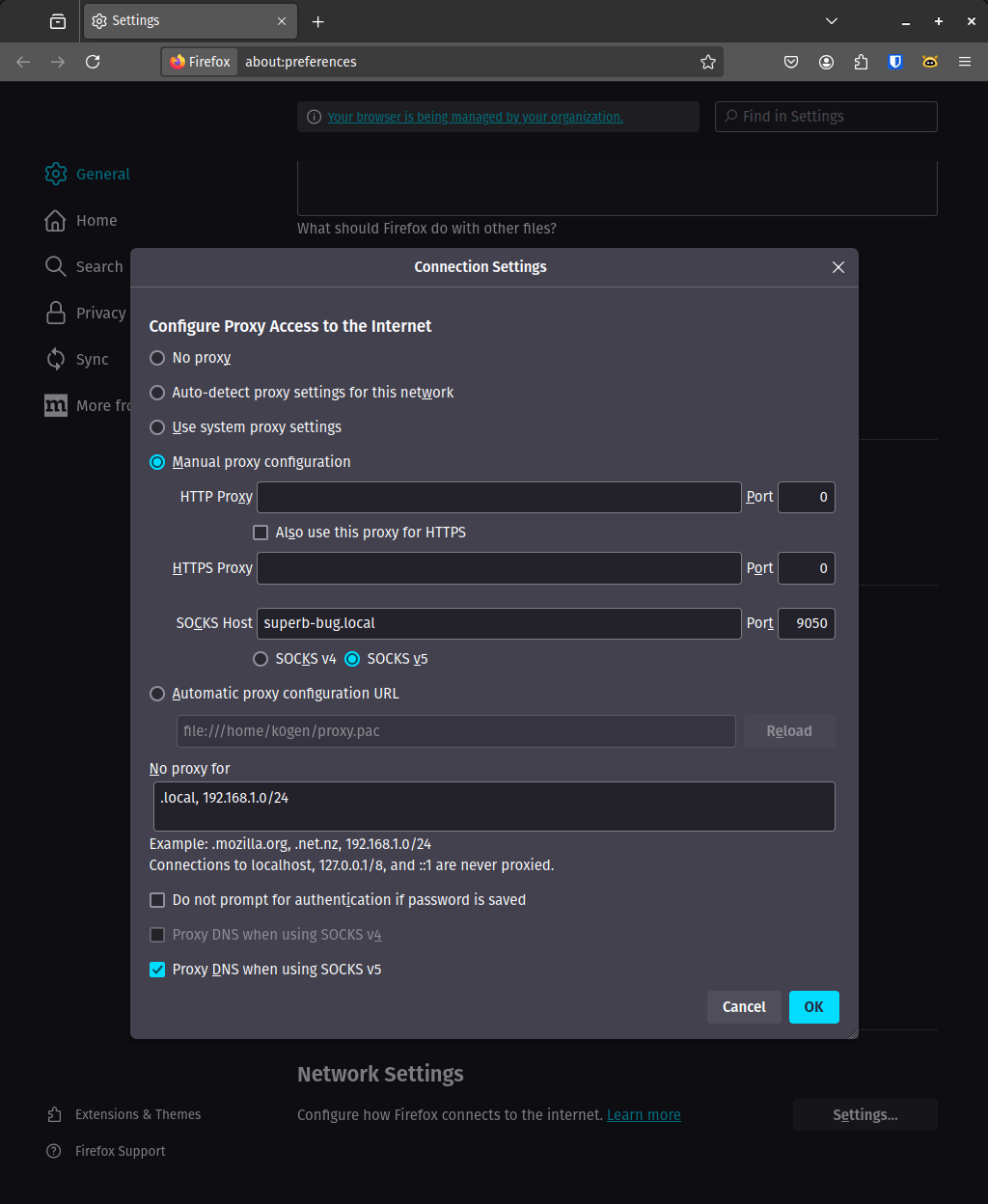
Please note that while this method works, it is not officially supported by StartOS. Future updates might overwrite these settings, so you’ll need to reapply them if necessary.
Stuart’s point about using the router is also valid and might be a simpler solution for some setups. However, if your router doesn’t support tor and you’re comfortable with a bit of manual configuration, this approach should work perfectly fine.
---
### Author:  [@StuPleb](https://community.start9.com/u/StuPleb)
#### Post date: [September 2, 2024, 1:40pm UTC](https://community.start9.com/t/how-to-start9-server-as-tor-proxy/1805/4 "2024-09-02T13:40:50Z")
Moved to guides/how-to now that a guide has been added.
---
### Author:  [@system](https://community.start9.com/u/system)
#### Post date: [September 4, 2024, 1:41pm UTC](https://community.start9.com/t/how-to-start9-server-as-tor-proxy/1805/5 "2024-09-04T13:41:05Z")
This topic was automatically closed 2 days after the last reply. New replies are no longer allowed.