I bought a used Lenovo M720q tiny after seeing this as known hardware to install start9 OS. I installed a 2TB NVME drive and now when trying to get into BIOS to disable the secure boot, I can get into BIOS by hitting the Enter and F1 over and over. I cannot disable that secure boot, all the good settings I need to change are in Black text, I can only scroll through the Blue letters up top. I know someone out there has already figured this issue out. I have already tried to disconnect the Cmoss battery for 20 mins and this went no where as well for disabling the password. I am open to ideas on how to get around this BIOS issue, thanks in advance if anyone can help out.
I have the same hardware with Proxmox and a StartOS VM. I had update to the latest BIOS version before and never seen this issue.
Ok I will try to download it and install it, weird thing is when I go to the Lenovo site and it asks to enter my SN of my machine, it then tells me that this is no longer supported. But this just might be what I have to do then, thank you for your help Sirius and Merry Christmas!
well I went to Lenovo and after trying to update to the newest BIOS, it asks for your SN and then tells me your device is no longer supported. When buying this hardware I wonder how you know if it is capable of being updated or not, this looks to be $150 mistake. I even tried to download StartOS directly to the bootable NVME and it still dont recognize it. Oh well
This may be what you are looking for:
I clicked on this link and this time it did not ask me for the SN of the unit so that was a relief, but when you download the .txt file for the USB, it states to make sure this usb disk is setup to boot from there. The problem is I cannot disable the secure boot, so when I enter BIOS, I cannot really make any changes unfortunately, I guess someone locked this unit with a password and it beeps twice every time it starts up and its just locked down. Looks like this thing is just parts at this point, I need to find one that doesn’t have the BIOS locked down on it. I bought it off Ebay with windows 11 on it, but when I reached out to them they just buy and sell computers so no help there. I found a place in Romania that can crack the BIOS but you have to extract out the BIOS file and send it to them to be hacked, I might do that if I can find out how to use a CH341a device, all this just to simply run startOS lol
If the unit still has Windows 11 on it, it’s probably easier to update the BIOS from there.
This is obviously all way outside the scope of StartOS support. But it looks like that unit has BIOS reset pins. You should be able to do so just by powering on temporarily, with the jumper set in the right place. Do some research on how to reset the BIOS, and do so at your own risk.
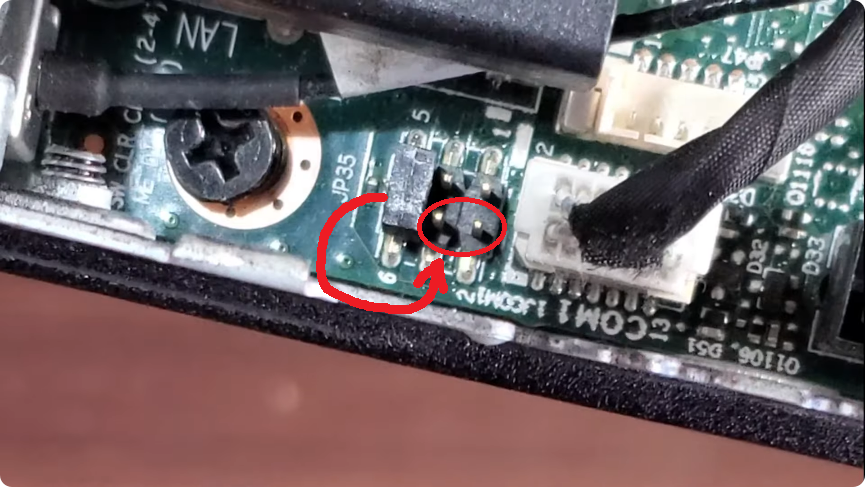
awesome sir, I will check that out, I hadn’t thought about moving the pins in that direction yet, this gives me something to do the rest the day. Thanks again sir for the help
THANKS Rexter, that photo you shared above helped me out big time . I was able to finally get into BIOS, then updated all my firmware at Lenovo and finally getting into the OS. I do appreciate it sir for the help
1 Like