I’m having trouble after setting up Start Tunnel. I can access Start Tunnel on my VPS remotely and I setup my server in Start Tunnel and the gateway in StartOS 0.4.0. I am not able to connect remotely with the lan IP address, 10.x.x.2. I received a “This site can’t be reached” timeout. I’m using Sharktech as my VPS provider, Starlink is my ISP provider. I’m not sure where to start troubleshooting this issue. Any help would be greatly appreciated and let me know what information you need that would be helpful. Thanks.
1. WireGuard handshake status
On the VPS, run wg show (or sudo wg show if needed). What does it report for latest handshake? Is it blank/“(none)”, or does it show a time?
2. Endpoint IP in the gateway config
Open the .conf file you applied on the StartOS gateway side. What’s on the Endpoint = line — is it Sharktech’s public IP, or does it look like a private address (10.x.x.x, 172.16–31.x.x, or 192.168.x.x)?
3. Is the VPS behind NAT?
On the VPS itself, run ip a and compare that IP to curl ifconfig.me (or curl ``icanhazip.com). Do they match, or is the address on the network interface different from your actual public IP?
4. WireGuard port
What port is StartTunnel using for WireGuard (check the web UI or wg show)? Have you confirmed with Sharktech (or their control panel) that inbound UDP on that port is actually allowed to the VPS — i.e. is there a separate firewall/security-group layer outside of StartTunnel itself?
5. Handshake stability over time
Run wg show two or three more times, a minute or two apart. Does the handshake ever appear and then go stale, or does it never appear at all? (This tells us if it’s a one-time failure to connect vs. a connection that drops.)
6. Recent config changes
Since installing StartTunnel, have you changed any network settings on the VPS (IP, interface, WAN config) after the initial setup? If so, have you restarted the StartTunnel service (start-tunneld) since making that change?
-
Shows latest handshake 1 sec ago.
-
Endpoint shows Sharktech’s public IP with a port at the end of the address. 70.x.x.x:xxxx
-
Ran
ip aandcurl ifconfig.me— both show 70.39.95.77. -
I wasn’t sure how to answer this question. Answer from Claude: “wg show confirms StartTunnel is listening on UDP 51820. Peer handshake is recent (39 seconds ago) with active data transfer, so inbound UDP on that port is reaching the VPS fine — doesn’t look like Sharktech is blocking it.”
 In my VPS dashboard, there are no firewall rules shown. I’ve attached the Firewall options screen.
 -
Doesn’t appear to stall. I had a 1 minute 47 second hand shake, then a 19 second hand shake after that.
-
I don’t believe I did, but I was trying a few things like deleting the server in Start Tunnel and deleting the gateway in StartOS and then reinstalling. To no success. I restarted the tunnel and no change.
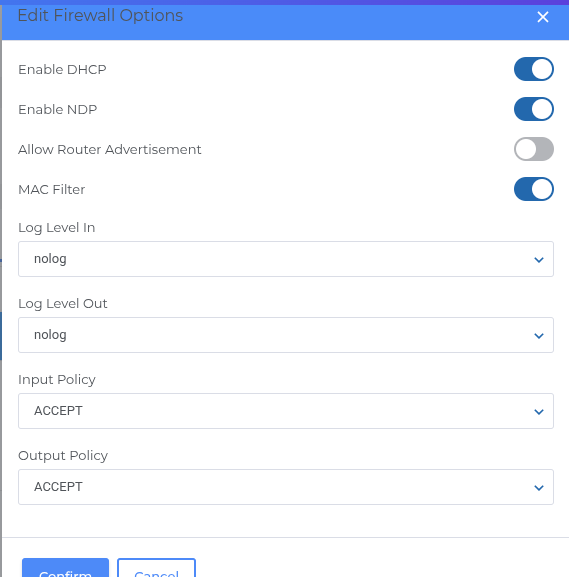
Let me know if I can answer these with any additional information. I really appreciate the help.
7. What device are you testing from, and is it also a StartTunnel peer?
When you try to reach 10.x.x.2, what machine/network are you on — home LAN, cellular, another location? Is that device running its own WireGuard connection to the StartTunnel VPS (i.e. did you create a separate device/peer in StartTunnel for this client, download its .conf, and activate it), or are you just typing the IP into a browser with no VPN active?
8. If that client has a WireGuard config, what does its status show?
On that device, is the WireGuard tunnel showing as connected? If it’s a phone/laptop with a WireGuard app, does it show a handshake, or is it not connecting at all?
9. IP forwarding on the VPS
Run cat /proc/sys/net/ipv4/ip_forward on the VPS. Does it return 1? (StartTunnel should set this automatically, but worth confirming it wasn’t reset by anything — you mentioned deleting/recreating the server and gateway a few times.)
10. Gateway status in StartOS
In the StartOS UI, under System → Gateways, what does the gateway entry show for status — connected/active? Does it list the same recent handshake time you saw on the VPS side, or does it look stale/disconnected from that side?
11. Exact thing you’re trying to reach
When you say “connect remotely with the LAN IP address” — are you opening https://10.x.x.2 (or http://) in a browser, trying to SSH to it, or something else? And is that the StartOS box’s own gateway-assigned IP, or a different device’s IP that you’re trying to reach through the gateway?
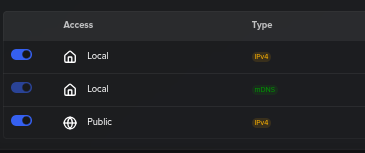
In StartOS’s Gateway UI, that “Public” toggle controls whether the service is advertised/bound on the gateway interface for external reachability, versus staying purely internal (LAN-only, even though the WireGuard tunnel itself is up). Your earlier diagnostics all came back clean because the tunnel was healthy the whole time — VPS reachable, handshake solid, correct endpoint, no NAT issue. But with “Public” off, StartOS just wasn’t exposing that service/IP out through the gateway at all, so nothing on the other end of the tunnel could ever reach it, no matter how good the WireGuard connection was. That’s a layer above WireGuard itself, which is why wg show looked perfectly fine the entire time — it’s not a networking-in-the-traditional-sense problem, it’s a StartOS-specific application setting.
Good instinct to dig into the UI toggles once the lower-level networking checks all passed — that’s exactly the right move when the “plumbing” checks out but the water still isn’t flowing.
And for what it’s worth — this stuff (WireGuard, NAT, gateway exposure, all of it) is genuinely confusing even for people who’ve been staring at it for months. You debugged it methodically and found the actual root cause. That’s the real skill here, not having memorized every toggle in advance.
Use the tools available Claude, GPT, whatever you want. The real world fact is the people who use these tools will gain knowledge and be leaps and bounds beyond the people who don’t. Great job.
go ahead and edit your post title with the [SOLVED]