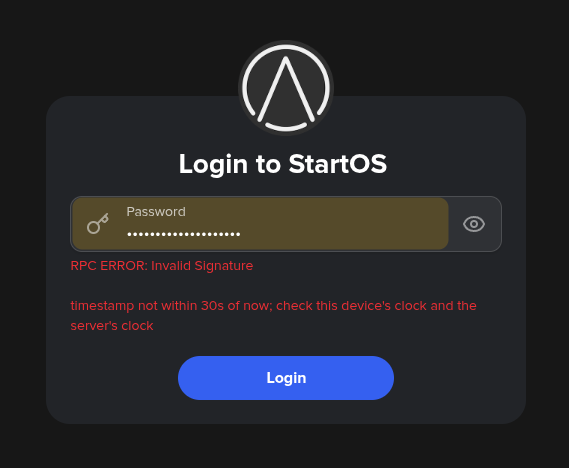
I just followed this upgrade guide Update to StartOS 0.4.0 - StartOS
I got to the login screen but can’t login with the error:
RPC ERROR: Invalid Signature
timestamp not within 30s of now; check this device's clock and the server's clock
I can’t find any posts on this topic.
Can someone help?
Please refer to the guide:
Hard refresh the page:
- Linux/Windows:
ctrl+shift+R
- macOS Firefox:
cmd+shift+R
- macOS Safari:
cmd+option+E, then cmd+R
Thank you for the quick reply.
I tried hard refreshing, an incognito tab and a separate browser that I never use.
None of it made the error message go away.
That error is the new signature-based login in 0.4.0 (it replaced the old cookie login). It means the clock on your device and the clock on your server disagree by more than 30 seconds, so the signature looks “expired.” Nothing’s broken — we just need the clocks back in sync. Easiest first:
1. Your device’s clock (the computer/phone you’re logging in from):
- Check its date, time, and timezone are right, and turn on automatic/network time (e.g. Settings → Date & Time → “Set automatically”).
- Quick test: does time.is match your device’s clock? If your device is off, fix it and retry — that alone often solves it.
2. If your device’s clock is correct, it’s the server’s clock:
- Your server just rebooted for the update and re-syncs its clock from the internet once it’s back. Give it 5–10 minutes and try again — a freshly-booted server can take a moment to sync (especially hardware without a battery-backed clock).
- If it’s still failing after that, tell me — I’d guess your server is having trouble reaching timeservers
Wow, I’m in!
My machine’s clock was 1 min ahead of “actual” time!
My machine doesn’t have automatic time setting because it requires location services, which I have disabled. Overtime the clock got out of sync.
I looked up the time online and changed it manually to match and logged in straight away 
I should have thought of this, the clue was in the error message!
Thank you so much for your help. 
Keep up the great work Start9 team!
Hey,
I just wanted to chime in and confirm that I am experiencing the exact same issue.
My ISP-provided router (Vodafone Station) is locked down and forces a slightly delayed time to the network via DHCP Option 42. Because the time drift is just over the 30-second limit, it causes the “Invalid Signature” error, completely locking me out of the StartOS web UI.
The most important part: This never happened before the recent update. Previously, the system ran perfectly fine, but now it aggressively prioritizes the DHCP-provided time upon every boot.
I spent hours trying to bypass this on the OS level via SSH, but due to the immutable nature of StartOS (where networking scripts reset configurations on boot), nothing survives a restart. Here is what I tried:
-
Masking the service: sudo systemctl mask systemd-timesyncd (StartOS unmasks it and forces it back on during boot).
-
Drop-in override: Creating /etc/systemd/timesyncd.conf.d/override.conf to force Cloudflare/CESNET servers (the system ignores this because DHCP Option 42 takes absolute priority in systemd).
-
Firewall block: Creating a systemd service and a delayed cron job (@reboot sleep 120...) to use iptables to block UDP port 123 traffic from the router’s IP (StartOS flushes custom firewall rules during its boot sequence).
Right now, my only workaround after a reboot is to SSH into the server, run sudo systemctl stop systemd-timesyncd, manually set the exact UTC time using sudo date -s "..." to the exact second, and quickly log into the UI.
Since many ISP routers completely lock users out of changing DHCP/NTP settings, it would be incredibly helpful if a future update could introduce a simple toggle in the Network UI to “Ignore DHCP Time” or allow a persistent custom NTP server.
Instead of trying changing the time on the Start9 server, why don’t you change it on the machine you’re trying to login from?
If you can see the time on the server, you can change your local machine time to it.
I would love to have the right time on server side. .)
You may need a router that allows you to control it, and allows your devices to access the internet unhindered. Granting a third party control over and access to your home network is not something I’d recommend. An acceptable quality router that won’t spy on you or control you can be bought for as little as $100. An entirely free and open one is also an option: https://router.start9.com/