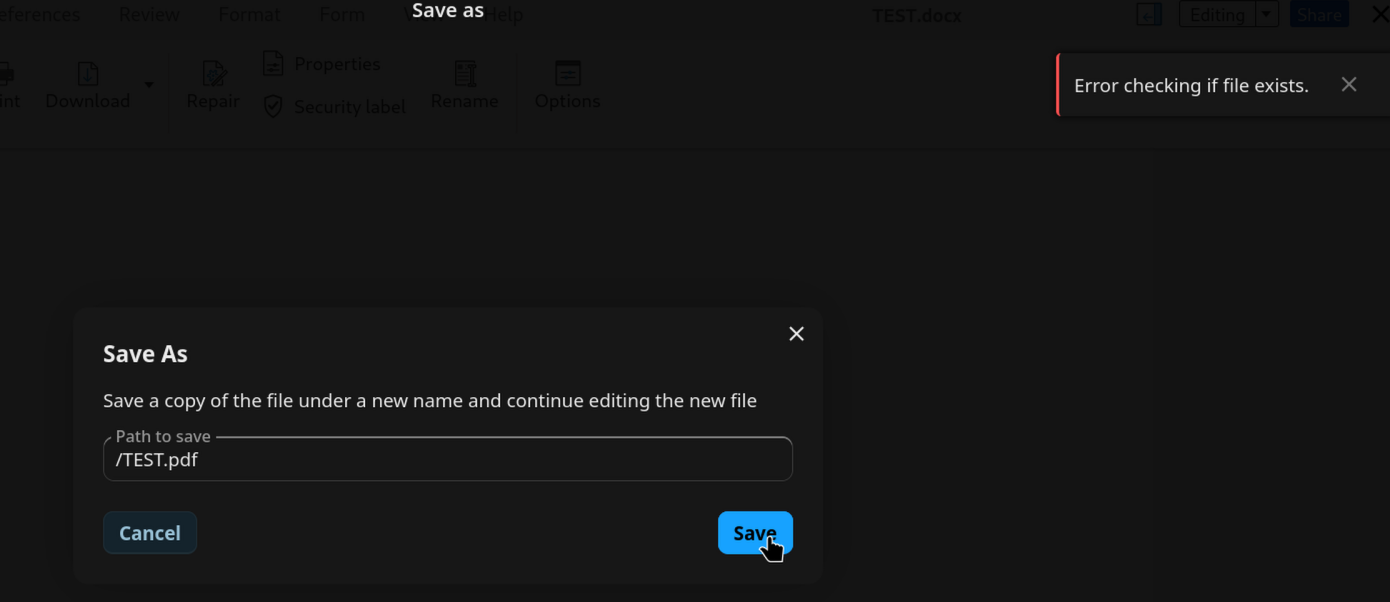
This isn’t Collabora. It’s a bug in Nextcloud’s End-to-End Encryption app, which is where the usePropFindInterceptor.ts line in your console comes from.
Before Save As or Export As writes anything, Nextcloud Office checks that the new file name isn’t taken, and it expects “not found” as the answer. With Enable E2EE navigation in browser switched on, the End-to-End Encryption app intercepts that check in your browser, mistakes the “not found” answer for a broken response, and raises the error you’re seeing, so the save stops.
The app’s developers have already fixed it (end_to_end_encryption#2094), but the fix isn’t in a release yet: 2.2.4 is still the newest version. It will arrive as a normal app update inside Nextcloud. Nothing needs to change on the StartOS side.
Until then:
In Nextcloud, open Personal settings → Security and find End-to-end encryption.
Switch off Enable E2EE navigation in browser.
Reload the tab with your document and try Save As again.
That setting only affects the web interface. With it off, the browser can’t open end-to-end encrypted folders, but the desktop and mobile apps still can. Switch it back on once End-to-End Encryption updates past 2.2.4.
The Content-Security-Policy message about templates.js isn’t part of this.