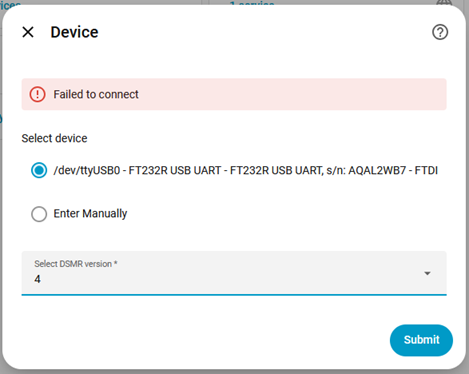
Context: I am trying to connect my Kaifa E0026 MA304C smart meter to Home Assistant on StartOS using a physical P1 to USB-A cable.
The Problem: When trying to set this up natively in the Home Assistant DSMR integration, the USB cable successfully shows up in the device dropdown menu (/dev/ttyUSB0 - FT232R USB UART). However, after selecting the correct DSMR version (Version 4) and hitting submit, it always throws a “Failed to connect” error in the UI.
Checking the Home Assistant Core logs confirms exactly why this is happening. While the host OS sees the port and populates the UI, the container itself lacks the actual device passthrough mapping to read it, resulting in this error:
2026-07-22 10:36:39.577 ERROR (MainThread) [homeassistant.components.dsmr] Error connecting to DSMR
…
FileNotFoundError: [Errno 2] No such file or directory: ‘/dev/ttyUSB0’
What I Tried (The Workaround): To bypass the missing container device mapping, I set up a network bridge via SSH. I run a lightweight Podman socat container (dsmr-bridge) as root with the --device flag to grab the physical USB connection and forward it to local port 2000. I can then successfully point Home Assistant’s DSMR app to the network IP/Port and it works perfectly.
The Issue with the Workaround: Whenever StartOS performs a backup operation, migration, or OS update, it completely wipes out custom user directories (~/) and manual containers on the base OS drive. The bridge gets nuked, my HA data stops logging, and I have to SSH back in to manually recreate the script and container.
Request: Could the Start9 team look into either:
-
Adding a native USB passthrough mapping or a hardware permissions toggle for the Home Assistant service, so it can read serial devices directly without throwing
FileNotFoundErrorexceptions? -
Providing a supported way to run persistent background scripts/containers that survive system backups and state resets?
Any advice or future fixes would be greatly appreciated!