Can I get LNBits to use the its public IP (for the API)?
On StartOS 0.4.0, fresh install of LNBits with Start-Tunnel configured. I have a port forward in place for the web UI (it works). When I create invoices with the Withdraw Links extension, it always creates them using the internal IP. I don’t see any options in the Actions menu to set it to anything different. How can I make LNBits use its public IP for LNURL-encoded links?
Further, it appears that LNbits connects to LND, always using the internal IP. Can this be changed?
Is it possible? If not, what are my options? Thanks in advance!
LNbits works by using the URL you’re logged in with as the base URL for all features. If you login you to .local and port number and generate QR codes, they’re not going to work.
I tested the LNURLw plugin on my setup and it worked fine.
Thanks for testing Stu, I’m not sure what I’m doing wrong. I gave LNbits a real domain (with Lets Encrypt cert) and can access the web interface, create QR codes and use lightningdecoder.com to see they do get the correct (public) callback URL. Redeeming doesn’t work.
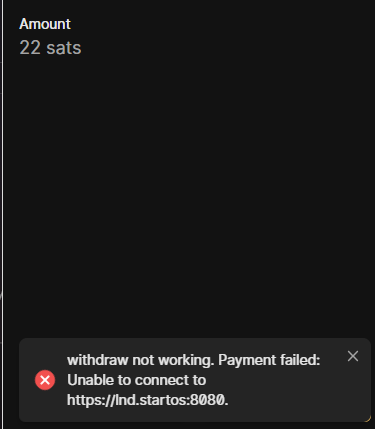
Most wallets do actually show the amount, confirming that it can be decoded but then give “network error” or “request failed” or something similar. The screenshot in my post is from Alby Go, and it’s indicating that somewhere in the network flow, it’s trying to access the LND instance using a private “lnd.startos” address. When I try redeeming from my coinos.io wallet, it tells me there’s a self-signed certificate in the chain (same message when I use curl -X GET https://ln.mydomain.net/withdraw/api/v1/links -H “X-Api-Key: myRedactedKey” -v). Since the callback URL has a Lets Encrypt cert, my guess is that it’s referring to that same “lnd.startos” address.
Can you confirm you’re actually able to redeem? I would appreciate any troubleshooting tips.
If it is a bug in the plug and how it works with LNbits with whats encoded, it’s well out of Start9’s scope.
I did two tests -
I logged into LNbits with my local IP, generated a QR and tried to redeem with Blink wallet - FAIL
I logged into LNbits with my .com, generated a QR and tried to redeem with Blink wallet - PASS
In my case, the QR encoded a LNURL. Sounds like you’re doing something else? I saw that you can create a link that then displays the URL, are you saying that link behaves differently?
1 Like
I did some more troubleshooting to see what I could find. I have no problem with receiving/sending to invoices if I use CLN as the backend. With LND, it always fails due to ‘https://lnd.startos:8080’ which appears to be hardcoded in the package. The LNbits container can resolve it fine but it appears that this URL is sent to the lightning network during the redeem flow, even though the entry point is https://ln.mydomain.net.
The problem isn’t with the Withdraw Links (LNURL-W) extension, I re-tested just using the out of the box Receive Invoice on my LAN (local IP) - it can’t even create the invoice because its trying to access https://lnd.startos:8080. Logs simply show:
2026-06-20T17:33:49-05:00 2026-06-20 22:33:49.37 | ERROR | Unable to connect to https://lnd.startos:8080., Status: pending
2026-06-20T17:33:49-05:00 2026-06-20 22:33:49.37 | INFO | 192.168.100.55:0 - “POST /api/v1/payments HTTP/1.1” 520
I’m wondering if this could be a result of having migrated to 0.4.0 instead of starting fresh. I will try to install LNbits outside of StartOS and see if I encounter similar problems.
Just an update… hours later. I setup a separate LNbits (outside of Start9), it works fine with Phoenix wallet redeeming. Alby Go still gave me an error because LND is local only so it seems to be an issue with Alby. Here’s the difference between the StartOS LNbits and the standalone.
StartOS: LND backend hardcoded to https://lnd.startos:8080
Standalone: LND configured to https://192.168.x.x:8080 (IP from Interface page of LND)
I’m not sure if others face this problem, I’m surprised it’s just me. If you’re out of ideas, I’m happy to just use the standalone LNbits I have now.
I’m kind of reluctant to go out of my way to break mine in order to find ways to replicate what you’re seeing. There’s absolutely no problem with LND being on a VLAN IP (what https://lnd.startos:8080 resolves to) or a physical LAN IP (https://192.168.x.x:8080/), how else would LNbits reach LND? How would all other features of LNbits work perfectly outside your network if that was somehow wrong? It’s LNbits (or that plugin’s) responsibility to generate an accurate QR code with a valid LNURL.
1 Like
This part makes me think maybe there could be something wrong with how StartOS + StartTunnel is configured, since it makes no sense. Your guess at the end is definitely wrong, no self-signed cert is created for service names, only interfaces exposd to the outside world. You can’t reach .startos addresses on your LAN.
Noooo… don’t break yours to replicate! I’ll update the thread if I find anything more in the coming days. I really appreciate your help so far, thank you!
I think I found the problem - it is a self-signed (Start9) cert because the Let’s Encrypt fails:
2026-06-21T14:33:38-05:00 2026-06-21T19:33:38.598558Z WARN startos::net::acme: src/net/acme.rs:217: ACME order failed for {“ln.mydomain.net”}: bad auth object: Invalid { error: Null }
2026-06-21T14:33:38-05:00 2026-06-21T19:33:38.598586Z DEBUG startos::net::acme: src/net/acme.rs:218: BadAuth(Invalid { error: Null })
2026-06-21T14:33:38-05:00 2026-06-21T19:33:38.598598Z INFO startos::net::acme: src/net/acme.rs:238: ACME order for {“ln.mydomain.net”} backing off for 60s
I have tried adding/removing (waiting 10 minutes in between) and resetting using ‘start-cli net acme remove/init’ commands. It always ends up in this state. Is there a way to get more detailed logging?
I don’t think so, but feel free to send me your LNbits domain privately so I can look at it. The only reason Lets Encrypt wouldn’t sign it is if it doesn’t exist or the records are bad.