Install of nextcloud@30.0.11 Failed: Migration Failed: Error: The migration for v29 did not complete. Please start the service and wait for all health checks to pass before updating to v30. at migration (file:///embassy.js:4311:15) at eventLoopTick (ext:core/01_core.js:183:11) at async file:///loadModule.js:240:18
Are you updating from Nextcloud 29.0.14? It is very important not to skip any version when updating Nextcloud.
Also, trying the tip provided in the error might help:
“Please start the service and wait for all health checks to pass before updating to v30”
Make sure the service is running correctly before going ahead with the update.
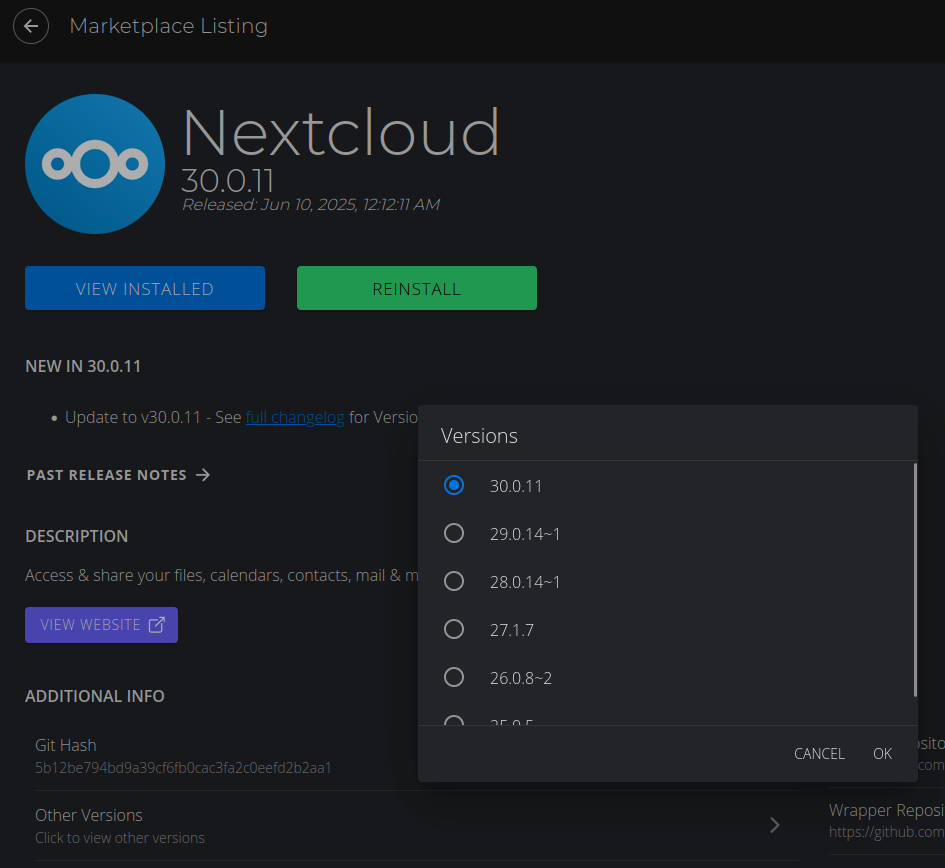
I’m on Nextcloud 27…how do I control which version I’m upgrading to?
You can go to the Nextcloud service in the Marketplace and then select the option for “Other Versions”
You can then choose the version you need.
With Nextcloud, you always need to update in successive order, not skipping any versions.
Also, creating a backup is always recommended when updating Nextcloud.
Thanks, that helped!
Unfortunately, when I got to 29, NC went into “Maintenance mode” for 30 min. So I tried restarting, and then going to 30. That failed because two major versions. So I went back down to 29. That failed; all I have now is an nginx 502. Logs have nothing interesting.
I used to run Nextcloud on the Umbrel before Start9. I don’t think I’ve ever had an upgrade that actually succeeded. Every single time I have to delete everything and reinstall from scratch. Maybe I “pressed the upgrade button wrong”.
This topic was automatically closed 2 days after the last reply. New replies are no longer allowed.