Services marked "Legacy" after update to 0.4.0-beta.9

Hi. I followed the instructions in the docs to update to 0.4. Went well until step 13, there was no update available for Nextcloud and Jam so they still have a “Legacy” tag. What shall I do?

Also, Step 14 and 15 are a bit unclear. Is a backup recommended in 0.4 before and after all services are updated? Thanks.

Step 14: Start All Services
Once all services are updated and backed up, you can start them. Wait for all services to fully start and confirm they are running correctly.

Step 15: Create a Backup!
Create a full system backup

You’ll need to update services. That’s step 13. There’s definitely updates available for NC. If you were updated to the latest version on v0351, then it’ll be the same version plus :0. Worst case, go into the marketplace and update it from there.

The backups are something you’d run once you have something worth backing up – i.e. a working service you’ve open, logged in and tested. Many services, especially NC, have their own scripts that need to run and will be in a perpetually broken state if you back up and restore them without having already been started.

You’re right that the docs need fixed.

Jam essentially doesn’t exist as a project right now, though they’re working on a new and improved version thanks to a grant. You probably noticed it was in a bad way in terms of successful mixes if you were using it. You should be able to run Jam in legacy mode and remove any funds.

Thanks for the reply Stu. I had already updated StartOS to v0.3.5.1 before I started the process to v0.4. I had also updated Nextcloud to the latest version, as per the instructions.

I did not get an option to update Nextcloud in v0.4 though. There was no update option in the marketplace either. I clicked the Reinstall button and now Nextcloud gets stuck when starting. This excerpt of the log repeats…

2026-06-24T13:41:54+02:00 Error: Database is uninitialized and superuser password is not specified.
2026-06-24T13:41:54+02:00 You must specify POSTGRES_PASSWORD to a non-empty value for the
2026-06-24T13:41:54+02:00 superuser. For example, “-e POSTGRES_PASSWORD=password” on “docker run”.
2026-06-24T13:41:54+02:00 You may also use “POSTGRES_HOST_AUTH_METHOD=trust” to allow all
2026-06-24T13:41:54+02:00 connections without a password. This is not recommended.
2026-06-24T13:41:54+02:00 See PostgreSQL documentation about “trust”:
2026-06-24T13:41:54+02:00 PostgreSQL: Documentation: 18: 20.4. Trust Authentication
2026-06-24T13:41:54+02:00 Error: docker-entrypoint.sh exited with code 1
2026-06-24T13:41:54+02:00 at ChildProcess. (/usr/lib/startos/package/index.js:18419:43)
2026-06-24T13:41:54+02:00 at ChildProcess.emit (node:events:524:28)
2026-06-24T13:41:54+02:00 at ChildProcess._handle.onexit (node:internal/child_process:293:12)
2026-06-24T13:41:54+02:00 daemon nextcloud waiting on postgres

Regarding Jam, I hadn’t used it in quite some time so didn’t know about the issues you mentioned. I started the Legacy version (after ensuring Bitcoin and Electrs were running), entered my username and password and got this error in the UI…

No connection to backend: The server reported a problem: 502 Bad Gateway

On the service in StartOS, under Health Checks it shows a spinning circle next to Jam API and status…

/usr/local/bin/check-api.sh: line 3: /dev/stdin: No such device or address /usr/local/bin/check-api.sh: line 4: ((: <= 5000: syntax error: operand expected (error token is “<= 5000”) Jam API is unreachable

I can try reload StartOS v0.3.5.1 and remove the funds there but I would like a clear path forward for Nextcloud first.

Thanks

I don’t understand the steps there, of how you got into a muddle with Nextcloud. Is there a precise sequence of events??

If you need to access Jam, you might indeed what to install v0351 somewhere and recover from backup. If you have to use your server for that (i.e. install v0351 on it again) you’ll be wiping it and starting fresh and recovering from backup with all that entails. There’s no downgrade.

The sequence of events…

I started with StartOS v0.3.5.1. I upgraded Nextcloud (NC) to the latest version. I logged in to NC to make sure it worked. I stopped the NC service and made a backup. I upgraded StartOS to v0.4. When it was running, I did not have an option to update the NC service. So I went to the Marketplace and tried the Reinstall button.

I loaded v3.5.1 on a new nvme disk, restored a backup and retrieved the Jam funds.

I then deleted all services except Nextcloud and updated to v0.4. It gave me an option to update NC to 33.0.5.0 which I did and was able to log in to NC and it looked to be working.

Then I stopped the NC service and tried to create a backup to a network folder. It’s about 29GB of NC data but after about 19GB it seems to be creating endless tiny files but not finishing the backup. Over 12 hours have passed and the backup size is growing very, very slowly but with lots of small files continuing to be created. Something must be wrong. I suspect it will eventually stop with some error. :frowning:

I found this in the kernel logs about 45 mins after the backup job started…

2026-06-29T11:31:22+02:00 hrtimer: interrupt took 5690 ns
2026-06-29T11:32:41+02:00 FAT-fs (nvme0n1p4): invalid media value (0xe3)
2026-06-29T11:32:41+02:00 FAT-fs (nvme0n1p4): Can’t find a valid FAT filesystem

…and this in the OS logs at the same time…

2026-06-29T11:32:41+02:00 2026-06-29T09:32:41.359343Z WARN list: startos::disk::util: src/disk/util.rs:446: Could not get vendor of /dev/nvme0n1: No such file or directory (os error 2)
2026-06-29T11:32:41+02:00 mount: /media/startos/tmp/E3RNS3F3QI4CPNNQVCSNYORWLN7Q2ENU: wrong fs type, bad option, bad superblock on /dev/nvme0n1p4, missing codepage or helper program, or other error.
2026-06-29T11:32:41+02:00 dmesg(1) may have more information after failed mount system call.
2026-06-29T11:32:41+02:00 2026-06-29T09:32:41.375039Z WARN list: startos::disk::util: src/disk/util.rs:525: Could not collect usage information: mount exited with exit status: 32
2026-06-29T11:32:41+02:00 2026-06-29T09:32:41.377853Z WARN list: startos::disk::util: src/disk/util.rs:446: Could not get vendor of /dev/nvme1n1: No such file or directory (os error 2)
2026-06-29T11:33:04+02:00 2026-06-29T09:33:04.887697Z WARN list: startos::disk::util: src/disk/util.rs:446: Could not get vendor of /dev/nvme0n1: No such file or directory (os error 2)

There doesn’t appear to be any GUI buttons to stop the Create Backup process.

The saga continues…

I gave up on the network backup of NC and opted to backup to disk. I then restored it into my original 0.4 but get a message when trying to load the NC UI…

Update needed
Please use the command line updater because updating via browser is disabled in your config.php.

I SSH’d in and ran the commands as per…

… but get the error…

Error: no container with name or ID “nextcloud.embassy” found: no such container

The NC service is running. Any ideas what to do here?

These instructions are for StartOS v0.3.5.1 – there’s no podman or *.embassy in StartOS anymore.

To go into LXC containers, you’d do this:

start-cli package attach nextcloud

from there you’d run

php /var/www/html/occ upgrade

Alternatively, you can add https://beta-registry.start9.com/ to your StartOS marketplace and install the latest version of Nextcloud that’s about to be released, that does the above upgrade for you automatically.

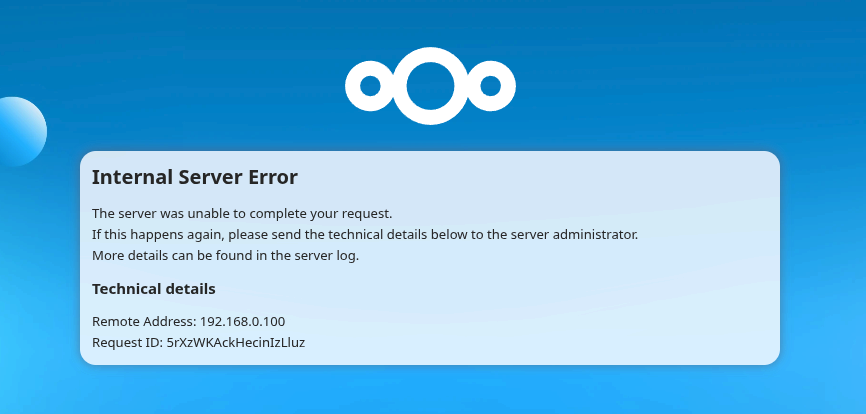
Thanks Stu. I installed the latest NC version (33.0.5.1) and that sorted the issue. I was able to load NC successfully. However, upon trying to access Settings in my NC user profile, I get an Internal Server Error. Now when I try ssh in to view logs, I used the first command you mentioned above and got this output…

Invalid Request: package.attach: multiple subcontainers found for nextcloud
◉ BWJHBEHKMUI5XPWEY74KQLA2GY3L4DBN => Name: postgres-sub; Image: postgres
◌ BWZ7EONTUOGO3QLIJREG7U36NERYL75D => Name: nextcloud-cron; Image: nextcloud
◌ LVFENTE5FXYDACU4TYFGOFFMY2NDSKP6 => Name: nextcloud-sub; Image: nextcloud
◌ PKUPGBRZ3PWMK2XT2T7AVZ5OAFPKV42A => Name: valkey; Image: valkey

I tried both middle options that include “Image: nextcloud” and found the nextcloud.log

Both log entries look the same for the error I captured when I click on Settings in my NC user profile. Perhaps this is an issue for the Nextcloud forum. Admittedly, I’m not sure when this issue crept in as I haven’t tried it for a long time, maybe up to a year. I have NC connected on my laptop but wanted to get into Settings on my NC user to get my Android mobile connected. Any suggestions to try? The Repair action for the StartOS service? Nextcloud forum?

{“reqId”:“YPRilKE7y5vnfkGpAuDU”,“level”:0,“time”:“2026-07-03T13:08:25+00:00”,“remoteAddr”:“192.168.0.100”,“user”:“User8724”,“app”:“”,“method”:“GET”,“url”:“/index.php/settings/user”,“scriptName”:“/index.php”,“message”:“[debug] FederatedUser is not empty – {“federatedUser”:{“id”:“jc3GshT1ZlVpuGu2AkCdCTKLJbGTuQE”,“userId”:“User8724”,“userType”:1,“displayName”:“User8724”,“instance”:“”,“basedOn”:{“id”:“jc3GshT1ZlVpuGu2AkCdCTKLJbGTuQE”,“name”:“user:User8724:jc3GshT1ZlVpuGu2AkCdCTKLJbGTuQE”,“displayName”:“User8724”,“sanitizedName”:“”,“source”:1,“population”:0,“populationInherited”:0,“config”:1,“description”:“”,“url”:“”,“creation”:0,“initiator”:null}}}”,“userAgent”:“Mozilla/5.0 (X11; Linux x86_64) AppleWebKit/537.36 (KHTML, like Gecko) Chrome/149.0.0.0 Safari/537.36”,“version”:“33.0.5.1”,“data”:{“app”:“”}}
{“reqId”:“YPRilKE7y5vnfkGpAuDU”,“level”:3,“time”:“2026-07-03T13:08:25+00:00”,“remoteAddr”:“192.168.0.100”,“user”:“User8724”,“app”:“index”,“method”:“GET”,“url”:“/index.php/settings/user”,“scriptName”:“/index.php”,“message”:“FederatedUser is not complete”,“userAgent”:“Mozilla/5.0 (X11; Linux x86_64) AppleWebKit/537.36 (KHTML, like Gecko) Chrome/149.0.0.0 Safari/537.36”,“version”:“33.0.5.1”,“exception”:{“Exception”:“OCA\Circles\Exceptions\FederatedUserException”,“Message”:“FederatedUser is not complete”,“Code”:500,“Trace”:[{“file”:“/var/www/html/apps/circles/lib/Service/FederatedUserService.php”,“line”:291,“function”:“confirmFederatedUser”,“class”:“OCA\Circles\Service\FederatedUserService”,“type”:“->”,“args”:[{“class”:“OCA\Circles\Model\FederatedUser”}]},{“file”:“/var/www/html/apps/circles/lib/CirclesManager.php”,“line”:161,“function”:“setCurrentUser”,“class”:“OCA\Circles\Service\FederatedUserService”,“type”:“->”,“args”:[{“class”:“OCA\Circles\Model\FederatedUser”}]},{“file”:“/var/www/html/lib/private/Teams/TeamManager.php”,“line”:166,“function”:“startSession”,“class”:“OCA\Circles\CirclesManager”,“type”:“->”,“args”:[{“class”:“OCA\Circles\Model\FederatedUser”}]},{“file”:“/var/www/html/apps/settings/lib/Settings/Personal/PersonalInfo.php”,“line”:206,“function”:“getTeamsForUser”,“class”:“OC\Teams\TeamManager”,“type”:“->”,“args”:[“User8724”]},{“file”:“/var/www/html/apps/settings/lib/Settings/Personal/PersonalInfo.php”,“line”:93,“function”:“getTeamMemberships”,“class”:“OCA\Settings\Settings\Personal\PersonalInfo”,“type”:“->”,“args”:[{“class”:“OC\User\User”}]},{“file”:“/var/www/html/apps/settings/lib/Controller/CommonSettingsTrait.php”,“line”:129,“function”:“getForm”,“class”:“OCA\Settings\Settings\Personal\PersonalInfo”,“type”:“->”,“args”:},{“file”:“/var/www/html/apps/settings/lib/Controller/CommonSettingsTrait.php”,“line”:179,“function”:“formatSettings”,“class”:“OCA\Settings\Controller\PersonalSettingsController”,“type”:“->”,“args”:[[{“class”:“OCA\Settings\Settings\Personal\PersonalInfo”},{“class”:“OCA\Settings\Settings\Personal\ServerDevNotice”}],]},{“file”:“/var/www/html/apps/settings/lib/Controller/PersonalSettingsController.php”,“line”:54,“function”:“getIndexResponse”,“class”:“OCA\Settings\Controller\PersonalSettingsController”,“type”:“->”,“args”:[“personal”,“personal-info”]},{“file”:“/var/www/html/lib/private/AppFramework/Http/Dispatcher.php”,“line”:205,“function”:“index”,“class”:“OCA\Settings\Controller\PersonalSettingsController”,“type”:“->”,“args”:[“personal-info”]},{“file”:“/var/www/html/lib/private/AppFramework/Http/Dispatcher.php”,“line”:118,“function”:“executeController”,“class”:“OC\AppFramework\Http\Dispatcher”,“type”:“->”,“args”:[{“class”:“OCA\Settings\Controller\PersonalSettingsController”},“index”]},{“file”:“/var/www/html/lib/private/AppFramework/App.php”,“line”:153,“function”:“dispatch”,“class”:“OC\AppFramework\Http\Dispatcher”,“type”:“->”,“args”:[{“class”:“OCA\Settings\Controller\PersonalSettingsController”},“index”]},{“file”:“/var/www/html/lib/private/Route/Router.php”,“line”:321,“function”:“main”,“class”:“OC\AppFramework\App”,“type”:“::”,“args”:[“OCA\Settings\Controller\PersonalSettingsController”,“index”,{“class”:“OC\AppFramework\DependencyInjection\DIContainer”},{“_route”:“settings.personalsettings.index”,“section”:“personal-info”}]},{“file”:“/var/www/html/lib/base.php”,“line”:1155,“function”:“match”,“class”:“OC\Route\Router”,“type”:“->”,“args”:[“/settings/user”]},{“file”:“/var/www/html/index.php”,“line”:25,“function”:“handleRequest”,“class”:“OC”,“type”:“::”,“args”:}],“File”:“/var/www/html/apps/circles/lib/Service/FederatedUserService.php”,“Line”:1124,“message”:“FederatedUser is not complete”,“exception”:“{“class”:“OCA\Circles\Exceptions\FederatedUserException”,“message”:“FederatedUser is not complete”,“code”:500,“file”:“/var/www/html/apps/circles/lib/Service/FederatedUserService.php:1124”,“trace”:“#0 /var/www/html/apps/circles/lib/Service/FederatedUserService.php(291): OCA\Circles\Service\FederatedUserService->confirmFederatedUser(Object(OCA\Circles\Model\FederatedUser))\n#1 /var/www/html/apps/circles/lib/CirclesManager.php(161): OCA\Circles\Service\FederatedUserService->setCurrentUser(Object(OCA\Circles\Model\FederatedUser))\n#2 /var/www/html/lib/private/Teams/TeamManager.php(166): OCA\Circles\CirclesManager->startSession(Object(OCA\Circles\Model\FederatedUser))\n#3 /var/www/html/apps/settings/lib/Settings/Personal/PersonalInfo.php(206): OC\Teams\TeamManager->getTeamsForUser(‘User8724’)\n#4 /var/www/html/apps/settings/lib/Settings/Personal/PersonalInfo.php(93): OCA\Settings\Settings\Personal\PersonalInfo->getTeamMemberships(Object(OC\User\User))\n#5 /var/www/html/apps/settings/lib/Controller/CommonSettingsTrait.php(129): OCA\Settings\Settings\Personal\PersonalInfo->getForm()\n#6 /var/www/html/apps/settings/lib/Controller/CommonSettingsTrait.php(179): OCA\Settings\Controller\PersonalSettingsController->formatSettings(Array, Array)\n#7 /var/www/html/apps/settings/lib/Controller/PersonalSettingsController.php(54): OCA\Settings\Controller\PersonalSettingsController->getIndexResponse(‘personal’, ‘personal-info’)\n#8 /var/www/html/lib/private/AppFramework/Http/Dispatcher.php(205): OCA\Settings\Controller\PersonalSettingsController->index(‘personal-info’)\n#9 /var/www/html/lib/private/AppFramework/Http/Dispatcher.php(118): OC\AppFramework\Http\Dispatcher->executeController(Object(OCA\Settings\Controller\PersonalSettingsController), ‘index’)\n#10 /var/www/html/lib/private/AppFramework/App.php(153): OC\AppFramework\Http\Dispatcher->dispatch(Object(OCA\Settings\Controller\PersonalSettingsController), ‘index’)\n#11 /var/www/html/lib/private/Route/Router.php(321): OC\AppFramework\App::main(‘OCA\\Settings\\Co…’, ‘index’, Object(OC\AppFramework\DependencyInjection\DIContainer), Array)\n#12 /var/www/html/lib/base.php(1155): OC\Route\Router->match(‘/settings/user’)\n#13 /var/www/html/index.php(25): OC::handleRequest()\n#14 {main}”}”,“CustomMessage”:“FederatedUser is not complete”}}

Trying to have federated users via the Federation app/plugin?

I didn’t purposely add anything to do with the Federation app / plugin. I do have NC & DAVx setup on my mobile to backup my calendar and contacts so perhaps it is related to that.

Anyways, I managed to get it sorted by logging into NC with my admin account, going to Administration settings, Administration, Overview, Security & setup warnings…

There were a few items listed. I dealt with those items that had an icon with a yellow triangle and exclamation mark , one at a time. After resolving each one, I checked to see if I could log into Settings in my user account. Perhaps clearing the warnings before this last one were also necessary but the final item I resolved that lead to the Internal Server Error in my previous post above being cleared was…

Please make sure to set the “overwrite.cli.url” option in your config.php file to the URL that your users mainly use to access this Nextcloud. Suggestion: “https://xxx-yyy.local:54589”. Otherwise there might be problems with the URL generation via cron. (It is possible though that the suggested URL is not the URL that your users mainly use to access this Nextcloud. Best is to double check this in any case.)

To check the config.php, I SSH’d into the Start9 machine, ran the command Stu mentioned above to get into the NC container…

start-cli package attach nextcloud

… and then running

cat config.php

… from /var/www/html/config#

The “overwrite.cli.url” line was missing so I added it from /var/www/html# using the command…

php /var/www/html/occ config:system:set overwrite.cli.url --value=“https://xxx-yyy.local:54589

… substituting “xxx-yyy” for my actual start9 instance.

Using cat again to check the config.php, I see the new line added to the bottom.

Hopefully this helps anyone with the same issue.

This topic was automatically closed 2 days after the last reply. New replies are no longer allowed.